
Installation of your cyber app should be from the app store via the link you received when your subscription was activated. in cases where you purchased or activated your device in another country, you may receive the error "Download not available in your area. The topics below will guide you through changing the region for your app store.
VPNs and the app store
VPNs can cause this issue if they are setup to another country. A simple way to check is to open a browser and go to www.google.com. Scroll to bottom of screen and see if a different country/city is displayed.
If a different country is displayed, check the settings of your VPN, change the country and attempt to install the app.
*Note - changing your VPN coutry may stop some apps who are dependent on your location to stop working.
Changing your app store region
The region of your app store determines which content you see as well as which apps you can download. Follow these instructions to change the region of your app store:
Before you change your region
You must spend any Apple store credit, cancel your subscriptions, and get a payment method for your new country or region before changing.
Use your iPhone or iPad to change your region
- Open the Settings app.
- Tap your name, then tap Media & Purchases.
- Tap View Account. You might be asked to sign in.
- Tap Country/Region.
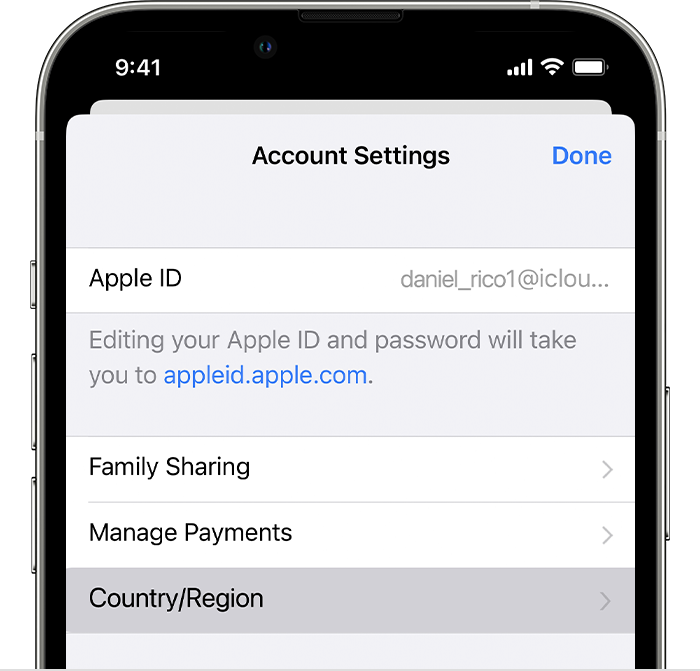
- Tap Change Country or Region.
- Tap your new country or region, then review the Terms & Conditions.
- Tap Agree in the upper-right corner, then tap Agree again to confirm.
- Select a payment method and enter your new payment information and billing address, then tap Next. You must enter a valid payment method for your new country or region.*
If you can't change your country or region
- If you can't change your country or region, make sure that you canceled your subscriptions and spent your store credit. Complete these steps before you try to change your country or region.
- If you're a part of a Family Sharing group, you might not be able to change your country or region. Learn how to leave a Family Sharing group.
- If you still can't change your country or region, or you have less store credit than the cost of a single item, contact Apple Support.
Attempt to install app
After the region has been changed successfully, attempt to install the app again. You should have received a link in an SMS/text to click on.
If you lost or deleted the link, contact our support team to have it resent to you.
Contact Us
Our agents and support team are here to answer questions, offer guidance and resolve any Cyber attacks.
To reach us:
Phone: +1 (223) 232-2220
Email: customersupport@cyberaid.app
You can submit a request in our Help Center or chat with us using our chatbot or our mobile cyber app.
Download CyberAid's App
Our mission at CyberAid is to keep you safe and secure online with all the cyber protection you need in one place. To get the most effective cyber defense, download our mobile cyber app.