
Backing up your data keeps it safe if a cyber attack ever happens and has added benefits of making device updates or changes easier.
This article focuses on using a PC to backup your iPhone but visit our iCloud and Mac articles if you choose to use those devices for your backup.
Backup Instructions using your PC
- On your Windows PC, open iTunes. If you don't have it on your PC, click here to download iTunes.
- Connect your device to your computer with a USB cable.
- If asked for your device passcode or to Trust This Computer, follow the onscreen steps.Get help if you forgot your passcode.
- Select your device in iTunes.Learn what to do if your device doesn't appear on your computer
- Click Summary
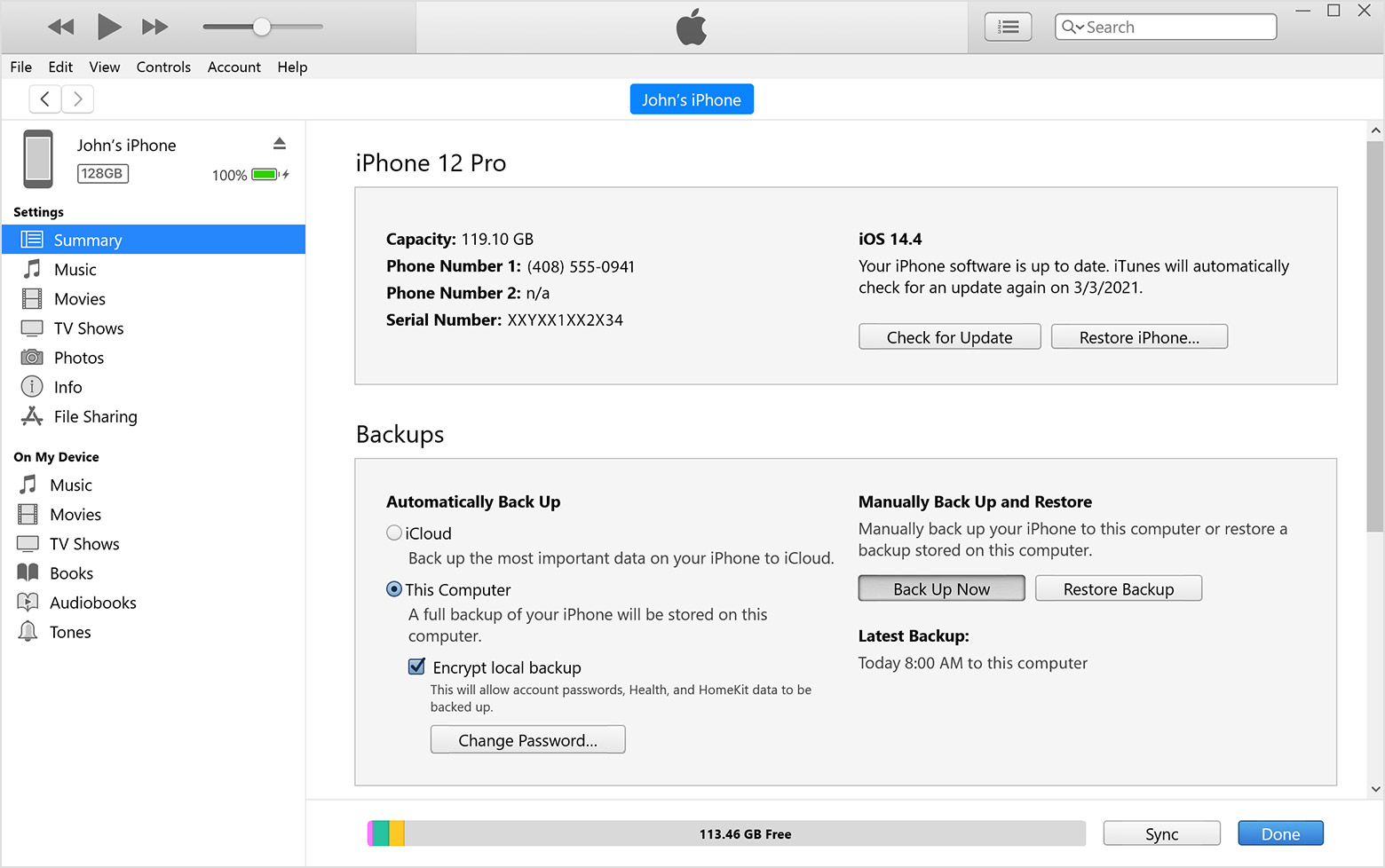
6. Click Backup Now
7. Don't disconnect your phone while the backup is happening. The date and time of the backup will be displayed once the backup is finished.
Apple Support Links
Contact Us
Our agents and support team are here to answer questions, offer guidance and resolve any Cyber attacks.
To reach us:
Phone: +1 (223) 232-2220
Email: customersupport@cyberaid.app
You can submit a request in our Help Center or chat with us using our chatbot or our mobile cyber app.