
What Does Scanning do?
The Cyber app has a tool which can scan your home network and analyses the devices connected to it and their current security state. If any device vulnerabilities are detected, new security tasks are created with guidance to help you reduce any risks to your home network.
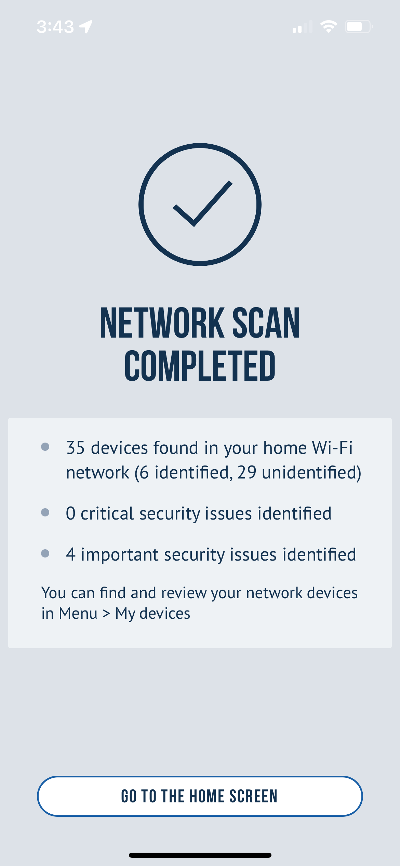
How do I scan my home WiFi network?
Follow these steps to scan your home WiFi:
-
Turn on any devices which is connected to your home WiFi(computers, TVs, speakers etc.)
-
Start your Cyber app
-
Tap menu(top left) and then tap rescan
-
Follow any instructions which are displayed
-
After the scan is finished, a summary of your devices and task will be shown
You can scan your home network as much and anytime you wish. We recommend scanning monthly to ensure any new devices are captured.
Unidentified Devices
After a scan, your app may show some unidentified devices and this can be normal depending on the security settings of the devices. Some device manufacturers limit their communication capabilities with other devices as a security measure however taking these steps will ensure as many devices as possible are discovered.
To confirm as many devices as possible get discovered, follow these steps:
1. Ensure all devices are powered on and connected to your home WiFi.
2. Rescan your home WiFi network by opening your cyber app, tapping help and tapping rescan.
Due to device manufacturer limitations, it is possible some devices will continue to show as unidentified.
Can I edit my unidentified devices?
Yes, you can edit any unidentified devices you see after scanning your network.
To edit devices:
1-Tap menu
2-Tap network devices
3-Tap unidentified devices and select the device you wish to change.
Can I scan a different network?
No, the Cyber app is only designed to be used with your personal home WiFi network and cannot be used to scan another network.
Contact Us
Our agents and support team are here to answer questions, offer guidance and resolve any Cyber attacks.
To reach us:
Phone: +1 (223) 232-2220
Email: customersupport@cyberaid.app
You can submit a request in our Help Center or chat with us using our chatbot or our mobile cyber app.
Download CyberAid's App
Our mission at CyberAid is to keep you safe and secure online with all the cyber protection you need in one place. To get the most effective cyber defense, download our mobile cyber app.